Inicio

Planes

Blog

Herramientas de imagen gratuitas

Gratis · Procesamiento en el navegador

Quitar fondoPNG transparente en segundos.Convertidor de imágenesCambia el formato de tus imágenes.PDF a imagenConvierte páginas PDF a JPG, PNG y más.Imagen a PDFCombina imágenes en un solo PDF.Comprimir PDFReduce el tamaño de un PDF, incluso a un peso exacto.Foto para documentoFotos de pasaporte y carnet al tamaño correcto, listas para imprimir.Comprimir imagenArchivos ligeros, imágenes nítidas.Redimensionar imagenTamaños exactos para cada plataforma.Recortar imagenEncuadra tu imagen a tu gusto.Ampliar con IAAmplía imágenes hasta 4×.

Herramientas de video gratuitas

Gratis · Procesamiento en el navegador

Comprimir videoReduce un video a un tamaño de archivo concreto, en tu navegador.

Herramientas Pro

IA en el servidor · Usa créditos

Quitar fondo con IA HDPrecisión en cabello y bordes finos.Conversor de imágenes HDAmplía y convierte en HD.Mejorador de imágenes con IAMejora los detalles con IA avanzada.
Ver todas las herramientas
PixVibe
Inicio

Herramientas de imagen gratuitas

Gratis · Procesamiento en el navegador

Quitar fondoPNG transparente en segundos.Convertidor de imágenesCambia el formato de tus imágenes.PDF a imagenConvierte páginas PDF a JPG, PNG y más.Imagen a PDFCombina imágenes en un solo PDF.Comprimir PDFReduce el tamaño de un PDF, incluso a un peso exacto.Foto para documentoFotos de pasaporte y carnet al tamaño correcto, listas para imprimir.Comprimir imagenArchivos ligeros, imágenes nítidas.Redimensionar imagenTamaños exactos para cada plataforma.Recortar imagenEncuadra tu imagen a tu gusto.Ampliar con IAAmplía imágenes hasta 4×.

Herramientas de video gratuitas

Gratis · Procesamiento en el navegador

Comprimir videoReduce un video a un tamaño de archivo concreto, en tu navegador.

Herramientas Pro

IA en el servidor · Usa créditos

Quitar fondo con IA HDPrecisión en cabello y bordes finos.Conversor de imágenes HDAmplía y convierte en HD.Mejorador de imágenes con IAMejora los detalles con IA avanzada.
Ver todas las herramientas
PlanesBlog
PixVibe

Herramientas de imagen con IA gratis: quita fondos, convierte, comprime, redimensiona y amplía en segundos.

Producto

Quitar fondoConvertidor de imágenesPDF a imagenImagen a PDFComprimir PDFFoto para documentoComprimir imagenRedimensionar imagenRecortar imagenAmpliar con IAComprimir videoPlanes

Herramientas Pro

Quitar fondo con IA HDConversor de imágenes HDMejorador de imágenes con IA

Recursos

HerramientasBlogPara agentes de IACómo tus archivos no salen del dispositivoPrompts de fuentes con IA

Legal

Términos del servicioPolítica de privacidadAviso legalLicencias de tercerosContacto

© 2026 PixVibe. Todos los derechos reservados.Un producto de Funovate Technology

Notificaciones

Aún no hay notificaciones

Te avisaremos cuando ocurra algo importante.

InicioBlogGuía
Guía
15 jul 20264 min de lectura

How to Remove an Image Background for Free (No Signup)

Get a clean transparent cut-out in seconds in your browser — no watermark, no account. The fastest free method, plus tips for tricky edges.

PV
Equipo de PixVibeHerramientas para el momento entre la idea y el resultado.

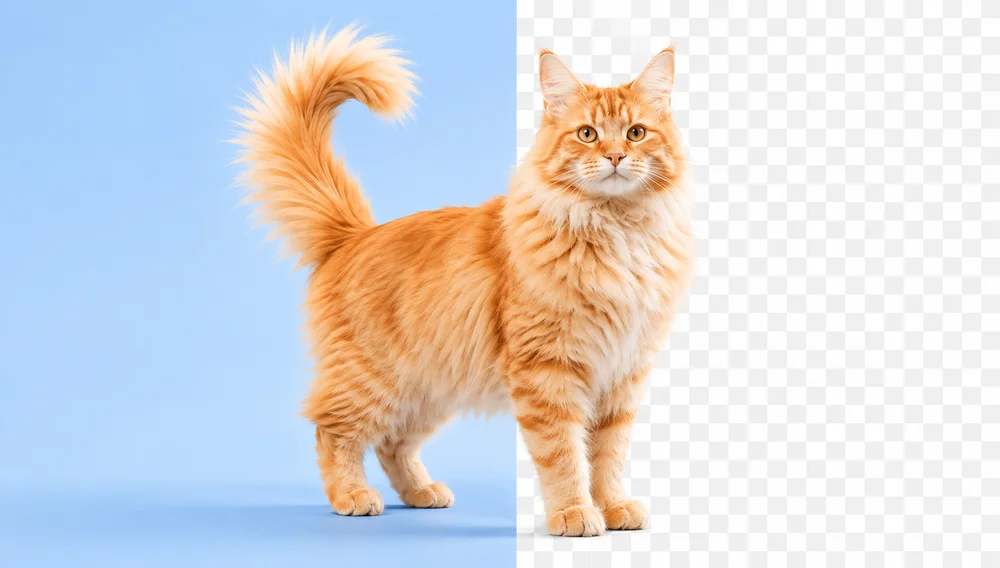
Removing the background from an image used to mean opening Photoshop, grabbing the pen tool, and spending twenty minutes tracing edges. Today an AI model does it in about a second — and you don’t need to install anything or create an account.

This guide shows you the fastest free way to get a clean, transparent PNG, and what to do when the edges get tricky.

The fastest way: do it in your browser

With PixVibe’s Background Remover, the whole thing runs locally in your browser. Your photo is never uploaded to a server, there’s no watermark, and there’s no sign-up wall for the basic tool.

  1. Open the Background Remover.
  2. Drag in a photo, paste it (Ctrl/⌘+V), or click to choose one. PNG, JPG, WebP and HEIC all work.
  3. Wait about a second while the AI separates the subject from the background.
  4. Download a transparent PNG — or swap the background for a solid white, black, or custom color.

When the edges get tricky

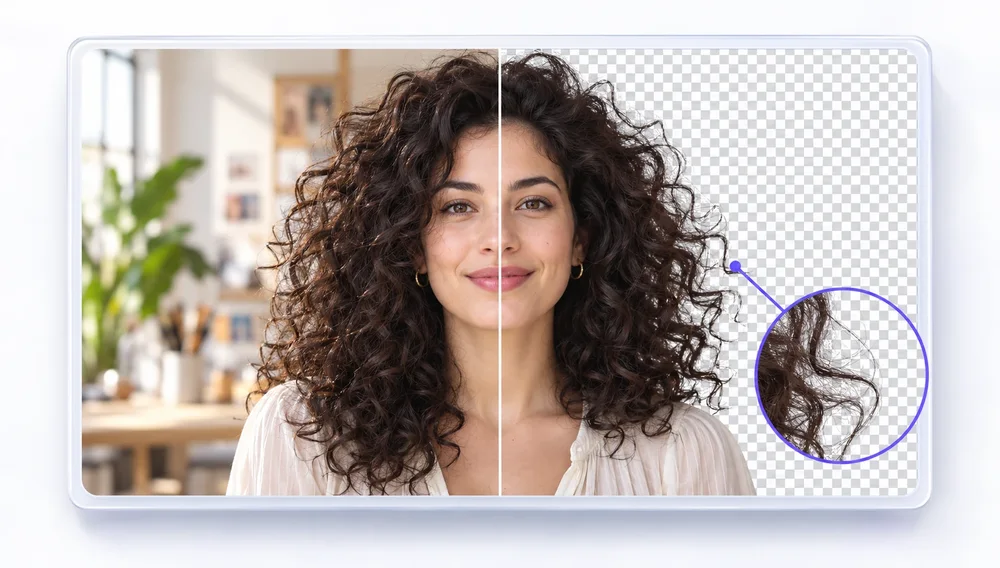
AI cut-outs are great, but hair, fur, and semi-transparent objects (glass, smoke) are genuinely hard. A few things that help:

  • Start with good contrast. A subject that stands out from its background gives the model cleaner edges to find.
  • Use the touch-up brush. If a stray patch survives or an edge gets clipped, paint it back or erase it by hand — no need to redo the whole image.
  • Try an advanced model. For hair-fine detail, the advanced models (InSPyReNet, Seedream) refine edges the fast local model can miss.

What to do with a transparent cut-out

  • Product photos. Drop your product onto a clean white background for Amazon, Etsy or Shopify.
  • Profile pictures & avatars. Cut yourself out and place yourself on any color or scene.
  • Logos & stickers. Turn any icon into a reusable transparent asset.
  • Design mock-ups. A transparent PNG drops cleanly onto any layout.

Tip: export as PNG (not JPG) to keep the transparency. JPG has no alpha channel, so it fills the transparent area with white.

Ready to try it?

Open the free Background Remover and drop in a photo — no signup, nothing stored, and it’s done in seconds.
Etiquetas
Fondo transparente›Sin subir archivos›

Añade PixVibe como fuente preferida en Google

EN ESTA PÁGINA

The fastest way: do it in your browserWhen the edges get trickyWhat to do with a transparent cut-outReady to try it?

Las buenas herramientas deberían sentirse invisibles

PixVibe mantiene simple la edición diaria de imágenes: las herramientas gratis funcionan en tu navegador.

Explorar todas las herramientas

Herramientas para esto

Quitar fondo

Quitar fondo

Haz cualquier imagen transparente — PNG gratis.

Abrir herramienta
Quitar fondo con IA HDPRO

Quitar fondo con IA HD

Bordes precisos en cabello, pelo y detalles finos.

IA en servidor · usa créditosDesde 10 créditos
Abrir herramienta

Artículos relacionados

Las ocho fotos de prueba usadas para comparar quitafondos gratis: pelo rizado, un golden retriever, zapatillas, una copa de vino, una bicicleta, tres amigas, un gato negro y un logo de texto 3D
Análisis

El mejor quitafondos gratis (2026): probé 8 herramientas

Probé 8 quitafondos gratis con las mismas 8 fotos. Puntuaciones, tamaño de descarga gratis, lotes y cuáles suben tu foto.

Leer artículo
PixVibe, la caja de herramientas de imagen privada para ti y tus agentes de IA: un agente abre un enlace y descarga una vela recortada
Guía

Cómo dejar que tu agente de IA edite imágenes con PixVibe

Deja que un agente de IA edite imágenes con PixVibe: un enlace por trabajo, sin clave de API. Probamos Claude, Codex y ChatGPT agent.

Leer artículo
Un frasco de perfume y un reloj fotografiados con el móvil, cada uno convertido en una foto de producto de 2000 × 2000 con fondo blanco puro
Guía

Fotos de producto con el móvil: tamaños para Amazon y Etsy

Haz fotos de producto con el móvil, quita el fondo y ajústalas a Amazon, Etsy, Shopify y eBay. Los requisitos oficiales en una tabla.

Leer artículo
Volver a todos los artículosQuitar fondo